March 14, 2026 ⋅ VERSION 1.14 (111)
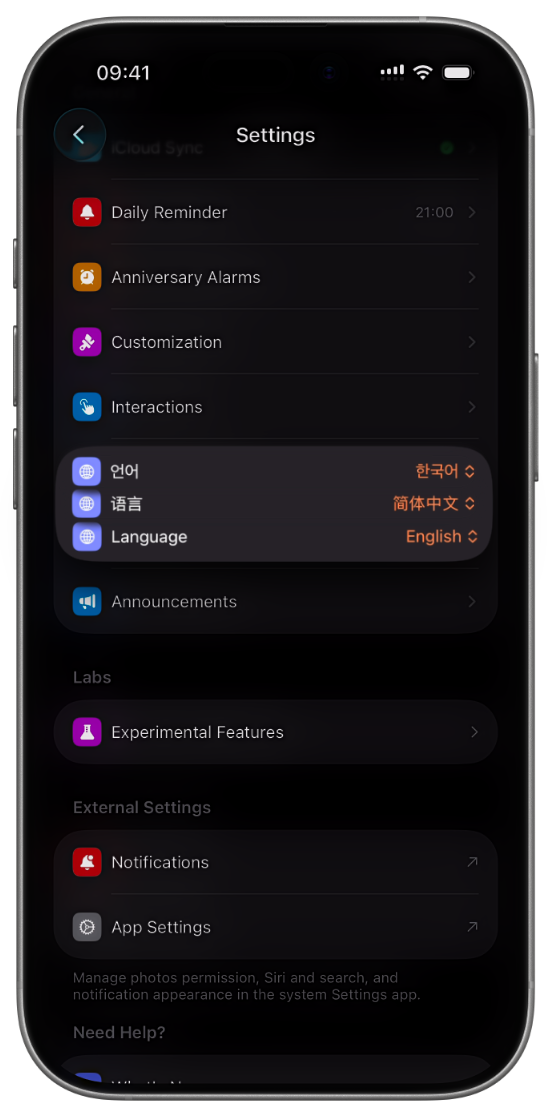
Joodle now supports multiple languages! Added Simplified Chinese and Korean. Will add more languages in the future!
How to switch language?
- After update, Joodle should automatically follow your device's "Language & Region" to set the language.
- If you still want to customize your language, you can do so via:
- In app: Go to "Settings > General > Language" to choose a supported language.
- In system app setting: Go to "Settings > Apps > Joodle > Language" to choose a preferred language.
Improvements & Bugfix
- Now you can backtrack on existing doodles.
- Also fixed the issue that non-dynamic island device unable to save doodle via dismissing the bottom sheet.
This update includes the following builds:
104, 105, 106, 107, 108, 109, 110, 111